# DebugTool v1.1.0
Category: Utility
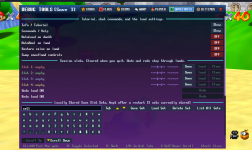
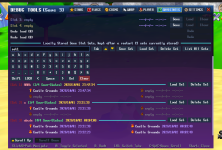
Added a new
Savestates tab!
• Save, load, and clear four slots, with location and timestamp info
• Undo/redo loads and manage named slot sets that persist after restarting
• Built-in keyboard for naming sets
• Toggle AutoLoad, AutoHeal, coin restoration, and swapped save/load controls
• Open the SaveStates tutorial and command help directly from the menu
• Scroll buttons now disable when the list cannot scroll further
The Savestates tab requires SaveStates v3.2.0 or newer (SaveStates - History). Enable both mods and restart the game. All other DebugTool features work without SaveStates.
Open the menu with
/debugtool or
/dt.
You are allowed to modify and release your own version of Debug Tool, including versions made for romhacks, without asking for permission — just clearly state that your release is a modified version of the original **Debug Tool (Also mention the version please) and credit iZePlayz as the original developer.